


AfterShip Package Tracker
4.633.78K Reviews
App Specs
- Version
- 5.25.6
- Updated On
- License
- Free
- Downloads
- 10,000,000+
- Developer
- AFTERSHIP MOBILE PTE. LTD.
- Categories
- Shopping
- Platform
- Android, iOS
Screenshots
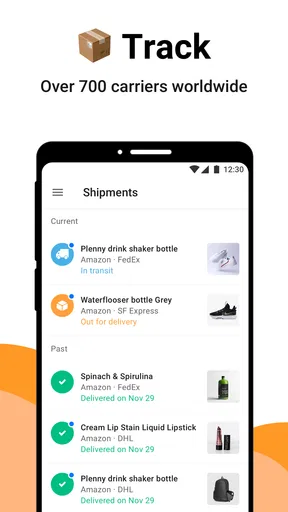
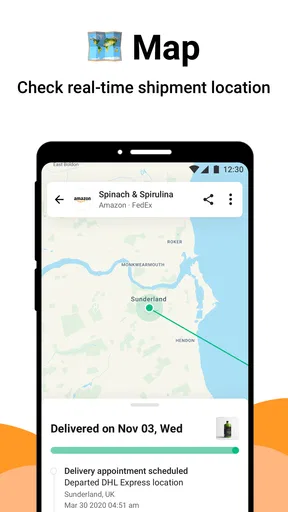
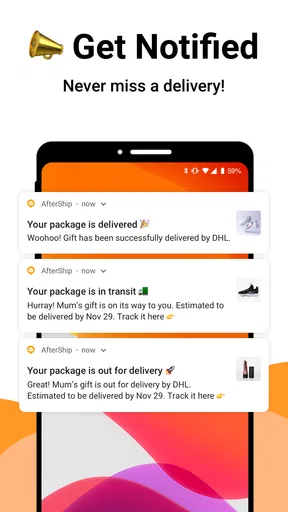
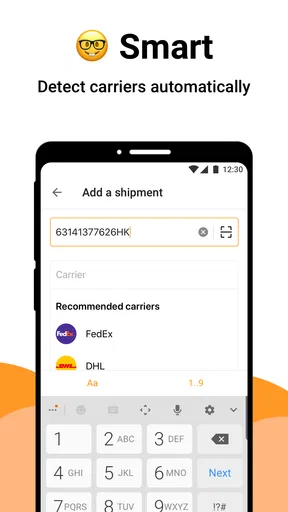
 Analysis by AppCompare
I find package tracking most useful when it removes a small but persistent worry: wondering whether an order has actually moved, whether a delivery estimate has changed, or whether I need to be available at home. AfterShip Package Tracker is built around that simple need. It is a free shopping app from AFTERSHIP MOBILE PTE. LTD. that brings shipment updates from many carriers into one place, rather than making me check several courier pages one by one.
In everyday use, its appeal is less about shopping itself and more about what happens after checkout. I can use it for a parcel from a large retailer, a delivery handled by a national postal service, or an order that changes carriers during its journey. The service supports more than 700 carriers, including UPS, DHL, FedEx, USPS, DPD and Amazon, which gives it a much wider reach than relying on a single courier’s application.
The main reason I would recommend it is convenience, not complexity. It is aimed at people who want a single view of several deliveries and do not want to remember which tracking page belongs to which order. At the same time, I would not treat it as a replacement for every retailer or courier app. Its value depends on how well the relevant tracking information is exposed by the carrier and on how much control a user wants over their delivery data.
What using the tracker feels like in real life
The most realistic use case is a busy week with several unrelated orders. Imagine buying household supplies from one store, a gift from another, and a replacement cable from a marketplace. Each order may have a different carrier and a separate email confirmation. Instead of opening those messages repeatedly, I can keep the shipment details together in one tracking workflow. That reduces the mental effort of remembering which number belongs to which parcel.
This is especially helpful when a delivery is not urgent enough to justify constant checking but important enough that I do not want to miss it. I might look at the app in the morning, see whether an item is still moving, and then decide whether I need to adjust my plans. That is a modest benefit, but it is exactly the kind of repeated friction a tracking app should remove.
The broad carrier coverage is also useful for people who shop internationally or use several online stores. A courier-specific app is usually excellent when all my parcels travel through that courier. It becomes less practical when every order follows a different route. AfterShip Package Tracker sits in the middle: it is more unified than separate carrier tools, while still focusing on shipment status rather than trying to become a complete shopping marketplace.
I would still keep the original order confirmation messages. The tracker is convenient for movement and delivery progress, but the retailer remains the better reference for product details, refunds, cancellations, payment questions and changes to the order itself. That distinction matters. A package tracker can tell me where a shipment appears to be; it does not replace the seller’s responsibility for what was purchased.
Worth Reading Before You Choose

Flipboard Shows What News Apps Must Do Beyond the Feed

Switching to Android Auto Means Rethinking Your Driving Routine

Google Calendar Makes a Crowded Week Easier to Manage

Ludo King Makes the Most of the Minutes Between Plans

Baby Panda World Brings Quick Play to Modern Phones, but Its Game Library Feels Busy

ESPN’s Live Game View Makes Following Close Games Easier
Where the wide carrier list helps
Supporting many carriers sounds straightforward, but it changes how useful the app is for households with mixed shopping habits. A parcel may be handed from one logistics provider to another, or a store may select a carrier only after the order is dispatched. Having one tracking destination can make those transitions easier to follow than manually searching for a new courier page.
There is a trade-off, though. A large carrier network does not guarantee identical detail for every shipment. Tracking events come from the carrier, so one package may show rich progress while another displays only broad milestones. If I need a highly specific operational update, such as a local delivery instruction or a detailed exception explanation, the carrier’s own channel may be more useful.
This is one of the most important practical expectations to set before using the app: it organizes tracking information, but it cannot improve the underlying scan history. When a parcel has not been scanned, no tracker can reliably invent a more precise location. I see the app as a clear window onto available shipment events, not as an independent source of logistics information.
How I would organize several deliveries
My preferred workflow is to add or review shipments soon after receiving dispatch information, then give each parcel a quick identity check. A tracking number alone can be hard to recognize later, especially when several orders are moving at once. If the app presents a way to label or distinguish shipments, using meaningful names such as “birthday gift” or “kitchen order” is more useful than leaving everything as a string of digits.
I also avoid treating every notification as equally important. A routine movement update is useful, but an exception or delivery attempt deserves immediate attention. This habit prevents the alert stream from becoming background noise. The practical insight is that tracking works best when I use it as a decision aid: check it when I need to decide whether to wait, contact the seller, or make arrangements for delivery.
For family or shared households, I would be careful about mixing everyone’s parcels into one account without a clear naming routine. A combined list can be convenient, but it can also make it unclear who owns a shipment. Keeping labels consistent and removing old entries when they are no longer relevant helps preserve the app’s usefulness over time.
Trust, controls and moments that deserve attention
I look at trust and control as part of the tracking routine, not as fine print to think about only after something goes wrong. In this section, I focus on how I would keep shipment details and alerts manageable, especially on a shared device or when several people’s parcels appear together. That leads naturally to a practical question: when does a universal tracker help more than the retailer’s or carrier’s own tools?
What the app’s reputation tells me—and what it does not
AfterShip Package Tracker has been available since July 30, 2014, and its Android listing shows more than ten million installs. It holds a 4.6 average from roughly 265 thousand ratings, with about 34 thousand written reviews. Those figures suggest that the app has reached a substantial audience and that many users find the basic tracking concept dependable enough to keep using.
Popularity is useful context, but I do not treat it as proof that every shipment experience will be identical. A high average can coexist with frustrations involving delayed scans, notification timing, account setup or an individual carrier. I would read recent user feedback for recurring problems while remembering that some complaints may reflect the courier or retailer rather than the tracking interface itself.
The app is free and rated for Everyone, which makes it easy to try without a purchase decision. Its current Android version is 5.25.6 and it requires Android 6.0 or later. Those details matter for someone using an older phone: compatibility should be checked before planning to rely on it for important deliveries.
Data-sensitive moments in the tracking process
Shipment tracking naturally involves information that can identify an order or connect a delivery to a person. A tracking number may reveal shipment activity when entered into a carrier system, while order labels, retailer names or destination details can make a parcel more recognizable. I therefore treat adding a shipment as a data-sensitive action, even when the app’s purpose is ordinary and practical.
My advice is to add only the shipments I genuinely want to monitor and to avoid putting private notes into labels. A short neutral description is safer than including a full address, the contents of a package, or another person’s personal details. This is not about assuming wrongdoing; it is simply good housekeeping for any app that gathers delivery information in one view.
I would also pay attention during sign-in, shipment import and notification setup. The important question is not just whether tracking works, but what information I am choosing to connect and whether I understand the result. If an order can be followed manually, I may prefer that for a sensitive delivery. If I want maximum convenience across many purchases, I would review each connection carefully instead of enabling everything automatically.
Account control matters more than a crowded dashboard
A tracker can become more valuable as I add more parcels, but that also makes account control important. I want to know which shipments are present, which alerts are active and which entries are no longer needed. A clean list is easier to trust than a dashboard filled with old deliveries that I never removed.
Before handing a phone to someone else, I would check whether the app is displaying private shipment information. The same applies to shared tablets or family devices. A delivery tracker may look harmless, but a visible list can reveal shopping habits, expected gifts or household activity. Using the app responsibly includes considering who can see the screen and who can access the account.
When I stop following a parcel, deleting or archiving it—where the available controls allow—would be part of my routine. I would also review notification settings rather than accepting every alert indefinitely. This gives me a better balance between timely information and unnecessary interruptions.
When the usual alternatives are better
The retailer’s order page is usually the best place for questions about an item, payment, returns or a changed delivery promise. The carrier’s own app or website is often preferable when I need local delivery options, service-specific instructions or the fullest scan history. AfterShip Package Tracker is strongest when my problem is fragmentation: too many carriers, too many order emails and no single place to see progress.
That makes the choice fairly clear. I would choose this app for a mixed set of deliveries and a simple overview. I would choose a courier-specific tool when most of my parcels use one carrier and I need that carrier’s specialized controls. I would stay with retailer tracking when I care more about the order relationship than the shipment journey.
There is also a reason some users may want to skip a universal tracker. If I buy only occasionally, track one parcel at a time and already receive sufficient updates from the seller, adding another app may not save much effort. Likewise, people who prefer not to centralize shipment details may feel more comfortable checking each carrier independently.
Small habits that make the experience more reliable
First, I would compare the tracking number and carrier before assuming that an entry belongs to a particular purchase. This prevents a common everyday mistake: following the wrong parcel simply because two orders were placed close together. Second, I would check the retailer’s message if the tracker shows an unusual delay, because the seller may have context that is not visible in a carrier event.
Third, I would use the app for planning rather than promises. A projected delivery day helps me decide whether to stay available, but I would not schedule something critical around a non-guaranteed estimate. Weather, local capacity, address issues and missed scans can all affect the final handoff. The tracker is most useful when it informs a flexible plan.
Finally, I would keep notifications selective. If every routine scan creates an interruption, I am likely to ignore the one alert that matters. A calmer setup—focused on meaningful progress or exceptions—makes the app more valuable without turning delivery monitoring into a constant task.
My cautious verdict
AfterShip Package Tracker is a sensible choice for people who regularly order from different stores and want one place to follow parcels across many carriers. Its free price, broad carrier support and straightforward purpose make it easy to understand. In my experience, the strongest benefit is not a flashy feature; it is the reduction of small, repeated searches across order emails and courier pages.
I would recommend it to frequent online shoppers, households managing several deliveries and anyone who wants a neutral overview instead of a collection of separate tracking tools. I would be more selective if I handled sensitive shipments, shared a device with other people, or needed carrier-specific delivery controls. In those situations, I would use the app only for the overview and keep the retailer or courier channel for detailed action.
The trust question comes down to user choice. I would add shipments deliberately, use restrained labels, review alerts and keep the list tidy. Those habits make the centralization useful without making it careless. If that balance suits the way you shop, this is a practical shopping companion; if your needs are limited to one courier or one occasional order, the usual alternatives may be simpler.
Overall, I see it as a focused tool rather than an essential app for everyone. It does one everyday job well when delivery information is scattered, while its limitations become visible when I expect it to control the shipment or explain information the carrier has not supplied. Used with that realistic expectation, it is an easy recommendation for organized parcel monitoring—and a tool I would keep alongside, not instead of, the original retailer and carrier channels.
Pros
- Tracks packages from many carriers in one app
- Automatic delivery updates help reduce manual tracking
- Supports shipment tracking across multiple countries
- Clean interface makes order status easy to check
- Push notifications can alert you to important delivery changes
Cons
- Some carrier updates may arrive late or lack detailed scans
- Advanced features may require a paid subscription
- Tracking accuracy depends on information supplied by carriers
- Too many notifications can become distracting for frequent shoppers
- Occasional carrier compatibility issues may affect tracking results
FAQs for AfterShip Package Tracker
What is AfterShip Package Tracker and what does it do?
AfterShip Package Tracker is a shipment-tracking app that lets you monitor packages from multiple couriers in one place. After adding a tracking number, the app can display shipping progress, estimated delivery information, and status updates. It is useful for people who regularly order online or manage deliveries from different carriers and want to avoid checking each courier’s website separately.
Which shipping carriers are supported by AfterShip Package Tracker?
AfterShip supports tracking for a broad selection of international and regional shipping carriers, including well-known postal services, express companies, and e-commerce delivery providers. Carrier availability can vary by country and may change over time. In my experience, the app generally identifies the carrier automatically from the tracking number, although some shipments may require selecting the courier manually.
Can I track several packages at the same time?
Yes, the app is designed to keep multiple shipments together in a single tracking list. You can add packages from different stores or carriers and review their current statuses without opening separate tracking pages. This is especially convenient when several orders are arriving at once. The exact number of shipments, organization tools, and available features may depend on the app version or subscription plan.
Does AfterShip Package Tracker send delivery notifications?
AfterShip Package Tracker can provide notifications when an important tracking event occurs, such as a shipment being accepted, moving through a facility, arriving in the destination country, going out for delivery, or being delivered. Notifications depend on your device permissions, app settings, and the information supplied by the carrier. If alerts do not appear, check both the app’s notification settings and your phone’s system permissions.
Is AfterShip Package Tracker free to download and use?
The app may be downloaded without an upfront charge, but some functions can be limited by usage rules, advertising, or optional paid features. Basic tracking is commonly available for individual users, while advanced tools may require a subscription or an AfterShip account. Before downloading, review the current listing in the Google Play Store or Apple App Store to confirm pricing, in-app purchases, and regional availability.


